Dropslate publishes to Instagram through the Instagram API with Instagram Login: you sign in with Instagram itself, and no Facebook Page is needed. The account must be a Business or Creator (Professional) account; a personal account cannot be connected. Meta has not finished reviewing Dropslate’s app, so for now only accounts added to the app as testers can connect. Publishing is a two-step container flow: Dropslate creates a media container from your file, waits until Instagram reports it ready, then publishes it.
Account requirements
Section titled “Account requirements”- An Instagram Business or Creator account (Instagram → Settings → Account type).
- Analytics needs the insights permission; an account connected before insights shipped shows Reconnect on the Analytics page until it is connected again.
Connect
Section titled “Connect”- Accounts → Networks → Instagram → Connect.
- Sign in with Instagram and approve the permissions on Instagram’s screen.
- The Instagram account appears under Your channels.
What you can publish
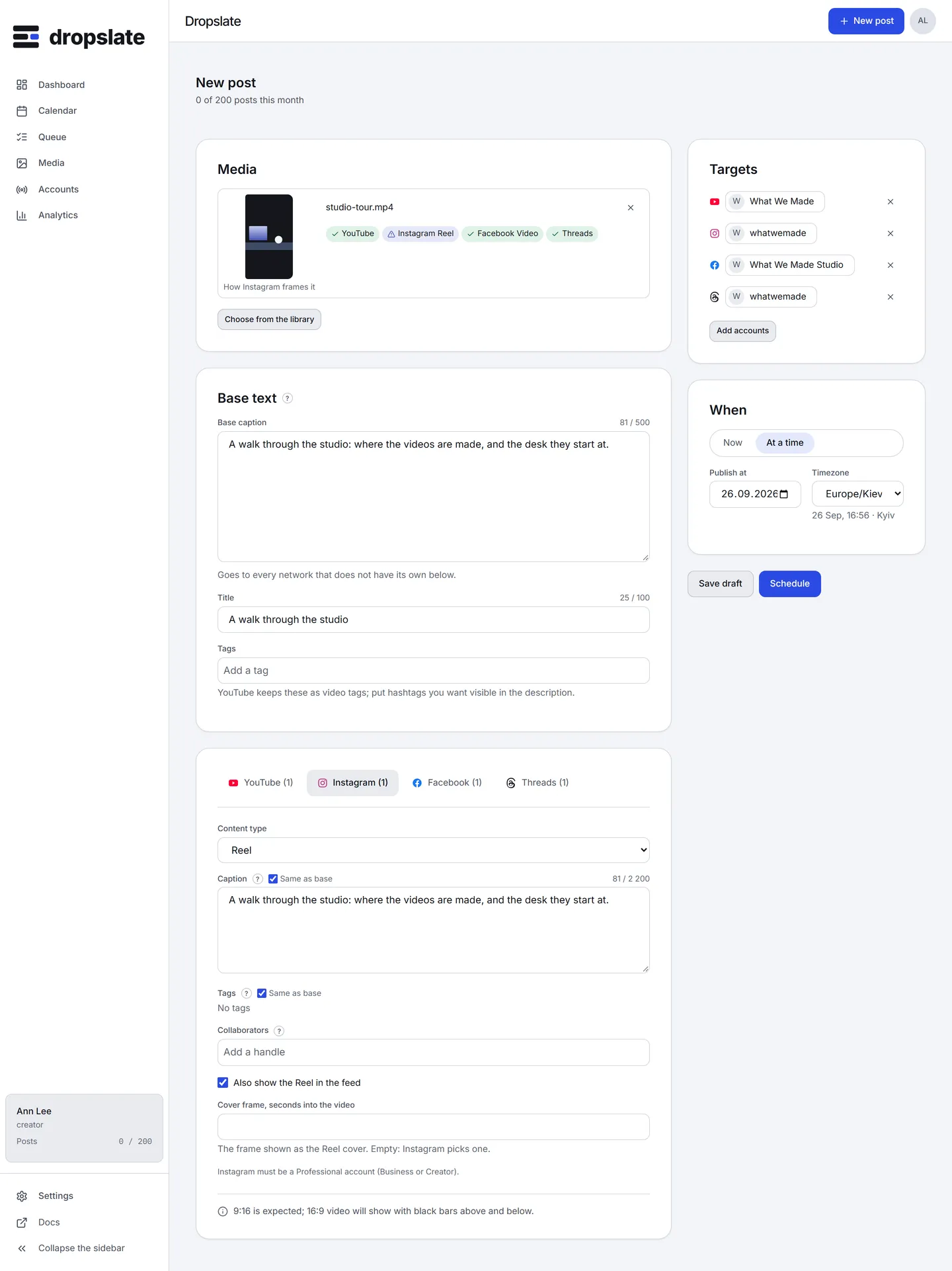
Section titled “What you can publish”Pick the Content type in the Instagram tab:
- Reel - one video. Caption, up to 3 collaborators, a cover frame (Use video frame at mm:ss) and Share to feed.
- Post - one JPEG image. Caption and alt text.
- Carousel - 2 to 10 images or videos. Caption and alt text.
- Story - one image or video, no caption. The text field is hidden; base text is not sent (
text_not_applicablein the plan says so).
From the API and MCP: perPlatform.instagram with contentType, collaborators, altText, coverMs Since 1.3.0; a caption for Instagram alone goes in overrides.instagram.
Limits
Section titled “Limits”| Content type | Media | Text | Title | Tags | Other | Notes |
|---|---|---|---|---|---|---|
| Reel | 1 file video: mp4, mov, up to 300 MB, duration 3 s–15 min, aspect 9:16, width up to 1920 px, 23–60 fps | 2,200 characters | — | — | links not clickable up to 30 hashtags up to 20 mentions up to 3 collaborators | 9:16 fills the screen; other shapes get bars. Up to 30 hashtags and 20 mentions. Links in the caption are not clickable. |
| Post | 1 file image: jpg, jpeg, up to 8 MB, aspect 4:5–1.91:1, width 320 px–1440 px | 2,200 characters | — | — | links not clickable alt text 1,000 characters up to 30 hashtags up to 20 mentions up to 3 collaborators | JPEG only, up to 8 MB. From 4:5 (portrait) to 1.91:1 (landscape). |
| Carousel | 2–10 files video: mp4, mov, up to 300 MB, duration 3 s–15 min, aspect 9:16, width up to 1920 px, 23–60 fps image: jpg, jpeg, up to 8 MB, aspect 4:5–1.91:1, width 320 px–1440 px | 2,200 characters | — | — | links not clickable alt text 1,000 characters up to 30 hashtags up to 20 mentions up to 3 collaborators | 2 to 10 photos or videos. |
| Story | 1 file video: mp4, mov, up to 100 MB, duration 3 s–1 min, aspect 9:16, width up to 1920 px, 23–60 fps image: jpg, jpeg, up to 8 MB, aspect 0.10–10.00, width 320 px–1440 px | no text | — | — | no links | Stories carry no caption. Video up to 60 seconds and 100 MB. |
Source: developers.facebook.com/docs/instagram-platform/instagram-graph-api/reference/ig-user/media · checked 2026-09-15
Network-specific behaviour
Section titled “Network-specific behaviour”- Container flow. After the container is created, Dropslate polls its status and publishes only when Instagram says it is ready; a slow file takes a minute or two longer than the scheduled time.
- 9:16 fills the screen for a Reel or Story; another shape shows with bars. The media card marks it shows with changes rather than refusing it.
- Feed posts take JPEG only, from 4:5 to 1.91:1; an image outside that range is refused (
aspect_unsupported). - Links in the caption are not clickable.
- Hashtags and mentions count against their own limits (30 and 20) inside the caption.
- Collaborators are added by handle and must accept on Instagram; the post is live before they do.
- Location tagging and user tags are not in this version.
Common errors
Section titled “Common errors”| Error | Cause | Fix |
|---|---|---|
?connect=refused, or no account listed after connecting |
The account is personal, not Business or Creator, or a permission was declined. | Switch the account to Business or Creator in the Instagram app, connect again and approve every permission. |
aspect_unsupported in the plan |
The image is outside 4:5–1.91:1 for a feed post. | Crop it, or post it as a Story. |
media_kind |
A video chosen for a Post, or an image for a Reel. | Change the content type. |
instagram_token_rejected |
Instagram no longer accepts the token. | Reconnect. |
instagram_permission_missing |
A permission was removed on Instagram’s side (the app was removed in the account’s settings). | Reconnect and grant every permission asked. |
instagram_rate_limited |
Instagram’s own daily publishing limit for the account - see Publishing limits. | The post retries later on its own; otherwise Retry the next day. |
failed while “still processing” |
Instagram did not finish the container in time. | Retry; a second failure usually means the file itself is invalid for that type. |
Related
Section titled “Related”- Compose - the Instagram tab.
- dropslate.top/integrations/instagram
- Connection problems